
Cardiology PACS (CPACS): Key Features and Benefits
Cardiology PACS: Features, Benefits and How to Choose the Right System
A cardiology PACS, often called CPACS, is a picture archiving and communication system built specifically for cardiac imaging. It stores, retrieves and distributes echocardiograms, cardiac CT, cath lab angiography and other cardiac studies in DICOM format, with the measurements and structured reporting cardiologists need. A general radiology PACS treats cardiac studies as plain images.
What a Cardiology PACS Is
A standard PACS was designed around radiology workflows: static images, a radiologist's narrative report, and distribution to referring physicians. Cardiology works differently. Cardiac studies are often dynamic, with cine loops from the cath lab, multi-beat echo clips and measurements that change between views. The report is not free text dictated after the fact. It is a structured document built from measurements, calculations and comparisons against priors.
A cardiology PACS is built for that reality. It connects to cardiology modalities, captures measurement data directly from the device, and turns that data into structured reports that flow into the EHR. It also handles the specialty's mix of imaging and non-imaging data, because a stress test result or an ECG tracing belongs in the same patient record as the echo that followed it.
How CPACS Differs from a Radiology PACS
Three differences matter most in practice. First, a CPACS supports cardiology measurement packages, so values such as ejection fraction, chamber dimensions and Doppler measurements are stored as data, not typed into a report by hand. Second, it is designed for comparison: cardiologists routinely read a study against one or more priors, and the system has to present them side by side without delay. Third, it integrates with the EHR and the cardiology workflow around it, including orders, results and billing data, rather than operating as a standalone image archive.
Modalities a Cardiology PACS Handles
Echocardiography
Echo is the highest-volume study type in most cardiology practices, and it produces large files with multiple clips per study. A CPACS stores echo studies in native DICOM format, preserves the measurement data captured on the ultrasound system, and makes prior echoes available for side-by-side comparison at the reading workstation. Because echo volume is high, reading efficiency matters here more than anywhere else: templates, automatic measurement import and one-click prior comparison are what separate a cardiology-specific system from a generic archive.
Cardiac CT and Cardiac MRI
Coronary CT angiography and cardiac MRI generate large, complex datasets. A cardiology PACS must retrieve these studies quickly, support multiplanar review, and keep them linked to the rest of the patient's cardiac record instead of in a separate radiology archive.
Cath Lab Angiography
Cath lab studies are cine angiography runs that document interventions in real time. A CPACS archives these runs with the procedural report, so the images from a stent placement can be reviewed later alongside the patient's echoes and ECGs.
Nuclear Cardiology, ECG and Stress Testing
Nuclear cardiology studies, resting ECGs, stress test results and Holter data complete the picture. A CPACS brings these into one record, so the cardiologist reads with full context instead of logging into separate systems for each test type.
Key Features Cardiology Practices Need
DICOM Support for Cardiology Measurements
The system must do more than store DICOM images. It should accept DICOM structured reporting and measurement data from echo carts, cath lab systems and other modalities, so measurements arrive in the report automatically. Manual transcription is slow and is a common source of errors.
Structured Reporting and Measurement Packages
Structured reporting templates for echo, cath, vascular and nuclear studies turn measurements into complete, consistent reports. Good templates include specialty measurement packages, automatic calculations, and findings libraries that cardiologists can edit. Reports should be reviewable and signable within minutes, not typed from scratch.
EHR Integration via HL7 and FHIR
A CPACS has to exchange orders, results and patient demographics with the EHR or EMR. HL7 interfaces remain the standard for orders and results, and FHIR APIs are increasingly expected for modern integrations. Bi-directional integration means the cardiologist opens a study from the patient chart and the signed report returns to that same chart without manual steps.
Prior Study Comparison
Cardiology is a comparison specialty. Ejection fraction trends, valve function and chamber sizes are judged against earlier studies. The system should retrieve priors automatically when a new study is opened and display them in sync, regardless of which modality produced them.
Remote Reading and Secure Sharing
Cardiologists read from offices, hospitals and home. A modern CPACS provides browser-based access with no local installation, and secure link-based sharing for referring physicians and patients. Sharing a study through a protected link replaces burning CDs, which is slow, easy to misplace, and hard to reconcile with patient access requirements under the 21st Century Cures Act.
Security, Access Controls and Audit Trails
Patient images are protected health information, and a CPACS must control who can see them. Look for encryption in transit and at rest, role-based access so staff see only the studies their job requires, and complete audit trails that record every view, share and export. Vendors should sign a business associate agreement and hold independent attestations such as SOC 2. These controls are not extras. They are how a practice shows regulators and patients that cardiac images are handled responsibly.
Workflow Benefits for Cardiology Practices
Faster Reporting
When measurements flow from the modality into a structured template, the report is mostly built before the cardiologist opens it. Review, edit and sign replaces dictate, transcribe and correct. Turnaround drops, and referring physicians get results sooner.
Fewer Manual Tasks
Study requests, CD burning, manual data entry and chasing priors across systems consume staff hours every day. A CPACS removes most of that work: studies move electronically, sharing takes one click, and the archive is searchable from any workstation. Staff time goes back to patient care.
Faster Answers for Referring Physicians and Patients
When reports are signed sooner and studies can be shared through a secure link, referring physicians plan treatment without waiting for a courier or a disc in the mail. Patients get electronic access to their own studies, which the 21st Century Cures Act expects. Fewer phone calls asking where a report is also means front desk staff spend less time chasing information the system should deliver on its own.
What CPACS Means for the Bottom Line
The financial case for a cardiology PACS is mostly a labor and throughput case. Manual tasks such as managing study requests, burning CDs and re-entering data are paid work that produces no clinical value. Removing them lets the same team handle more studies per day. Faster reports shorten the path from study to billed result. Secure electronic sharing supports compliance with the 21st Century Cures Act, which reduces the risk of penalties tied to delayed patient access to health information. Cloud storage for legacy studies also ends the cost of maintaining aging local archives and physical media. None of this requires a larger team. It requires removing the friction that slows the current one down.
Reporting speed has a direct revenue effect as well. A signed report is what triggers billing and follow-up scheduling, so every day a study sits unread delays revenue the practice has already earned the right to collect. Practices that cut report turnaround from days to hours see that cash arrive sooner, and referring physicians who receive fast, complete reports tend to keep sending patients.
Cloud CPACS vs On-Premise CPACS
An on-premise CPACS runs on servers the practice buys, houses and maintains. That means capital cost up front, IT time for patching and upgrades, and a plan for storage growth as study volumes and file sizes rise. A cloud CPACS runs on the vendor's infrastructure. The practice pays a subscription, accesses studies through a browser, and scales storage without buying hardware. Cloud systems also make multi-site access and remote reading straightforward, since every location works from the same archive. For most practices without a dedicated imaging IT team, the cloud model removes the maintenance burden that causes on-premise systems to fall behind on updates and security.
What About Hybrid Setups?
Some hospital-based groups run a hybrid model, with recent studies cached locally for reading speed and the long-term archive in the cloud. This can work during a transition, but it adds synchronization and support complexity. For most independent practices, a fully cloud archive is simpler: one system of record, one security model and no local servers to retire later.
How to Choose a Cardiology PACS
Start with modality coverage: the system must handle every study type the practice performs, including echo, cath lab and nuclear. Confirm that measurement data imports automatically from your existing devices, and test the structured reporting templates against your real reports. Check the integration list for your EHR, and ask whether interfaces use HL7, FHIR or both. Evaluate security and compliance: HIPAA safeguards, encryption in transit and at rest, access controls, and independent attestations such as SOC 2. Ask about legacy study migration, because years of priors have to move with you. Finally, review the total cost over several years, including interfaces, storage growth and support, not just the first-year price.
Migration, Training and Support
Ask how legacy studies will be migrated, how long it takes, and whether priors will be searchable in the new system from day one. Confirm what training is included for cardiologists, sonographers and front desk staff, because adoption problems usually come from workflow gaps, not the software itself. Finally, check support hours and response times. A reading backlog caused by an unresolved interface issue costs more than the support contract that prevents it.
Cardiology PACS from SARC MedIQ
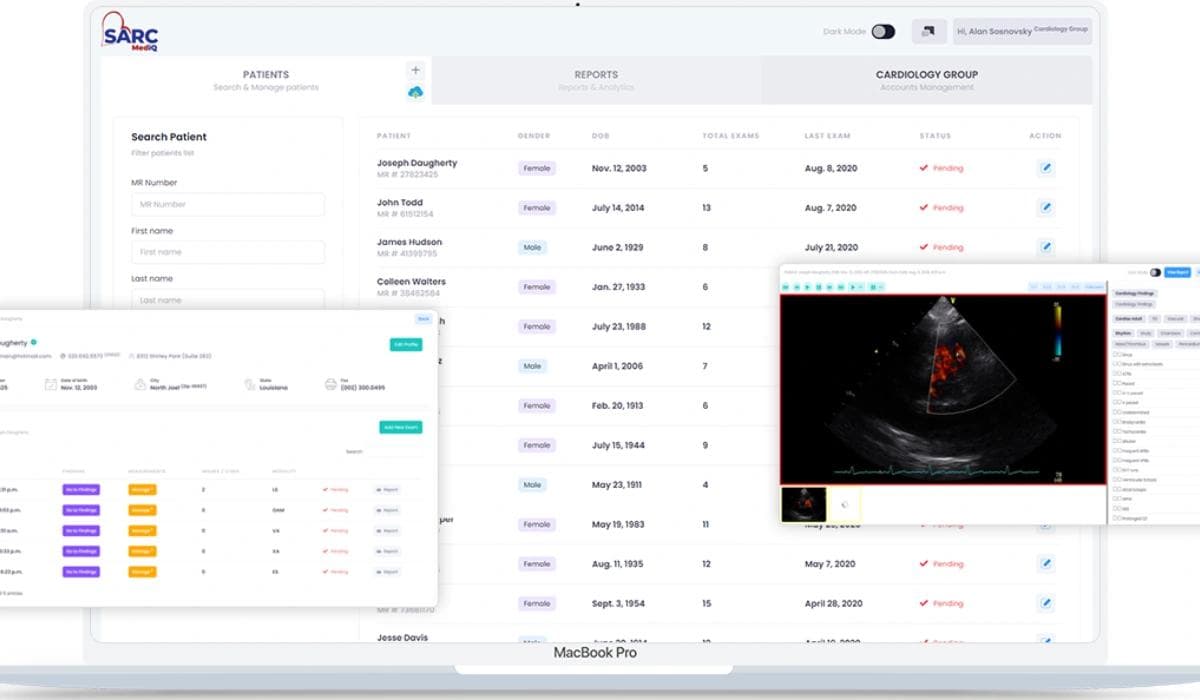
SARC MedIQ provides a cloud-based cardiology PACS built around these requirements. It integrates with nearly all existing EMR and EHR systems, so cardiologists work with complete patient data and no manual transfers. Its AI-powered reporting generates detailed reports in under two minutes from pre-templated findings, which cardiologists can edit before signing. Study sharing uses a secure cloud link protected by two-factor authentication, so patients and referring physicians open studies on any device with no downloads and no CDs. Legacy studies are stored securely in the cloud and remain easy to retrieve. The platform runs on infrastructure aligned with FDA, HIPAA and HL7 requirements and with the patient access rules of the 21st Century Cures Act.
Conclusion
A cardiology PACS is not a smaller radiology PACS. It is a system built for cardiac modalities, measurement-driven structured reporting and comparison-based reading. The right CPACS removes manual work, shortens reporting time and keeps the practice compliant without adding staff. If your team still burns CDs, re-enters measurements or waits on priors, it is worth seeing what a modern cloud CPACS changes in a working day. Book a 30-minute demo to see SARC MedIQ CPACS on real cardiology workflows.
Frequently asked questions
A cardiology PACS, or CPACS, is a picture archiving and communication system designed for cardiac imaging. It stores and manages echocardiograms, cardiac CT, cardiac MRI, cath lab angiography, nuclear cardiology studies, ECGs and stress test results in DICOM format. Unlike a general PACS, it captures cardiology measurements as structured data, supports measurement packages and structured reporting, and integrates with the EHR so reports and results stay in the patient chart.
A regular PACS is built for radiology: static images and narrative reports. A CPACS is built for cardiology, where studies include cine loops, echo clips and measurement data that drive the report. It imports measurements directly from modalities, builds structured reports from them, retrieves priors automatically for comparison, and combines imaging with ECG and stress data in one record. The difference shows up in reporting speed and in how little manual entry the cardiologist does.
Yes. A modern CPACS connects to EHR and EMR systems through HL7 interfaces for orders, demographics and results, and increasingly through FHIR APIs. With bi-directional integration, a cardiologist opens a study from the patient chart, signs the report in the PACS, and the final report files back to the same chart automatically. Before buying, confirm your specific EHR is on the vendor's integration list and test the workflow with real orders.
A cloud CPACS can meet HIPAA requirements when the vendor applies the right safeguards: encryption in transit and at rest, role-based access controls, audit logging and a signed business associate agreement. Look for independent security attestations such as SOC 2 as well. Cloud delivery also helps with secure sharing, since studies are sent through protected links with authentication instead of physical media that can be lost. Always verify the vendor's compliance documentation before migrating patient data.
Implementation time depends on the number of sites, modalities and legacy studies to migrate. A single practice moving to a cloud CPACS with standard EHR integration typically goes live in weeks rather than months, because there is no server hardware to install. Legacy archive migration runs in the background so current studies are available first. A realistic plan covers interface setup, template configuration for your report types, staff training and a short parallel period before the old system is retired.

Colin McCann, Ph.D.
Colin McCann, Ph.D., is the Co-Founder and CTO of SARC MedIQ, where he leads AI and healthcare imaging technology initiatives. His background spans machine learning, computer vision, cloud healthcare infrastructure, and large-scale medical data systems, with prior research experience at the National Institutes of Health and the University of Maryland. He specializes in building scalable AI-driven solutions for medical imaging, reporting, and healthcare workflow automation.

Never miss an insight that matters
Subscribe to get the latest articles, case studies, and product updates delivered straight to your inbox.
Ready to modernize your practice?
Discover how MedIQ and optional modules can streamline your workflow, improve efficiency and modernize your practice.
Book 30-min demo